
MengPaw.Browser · Android Browser APK · v0.10.1
A browser for people
also built for agents
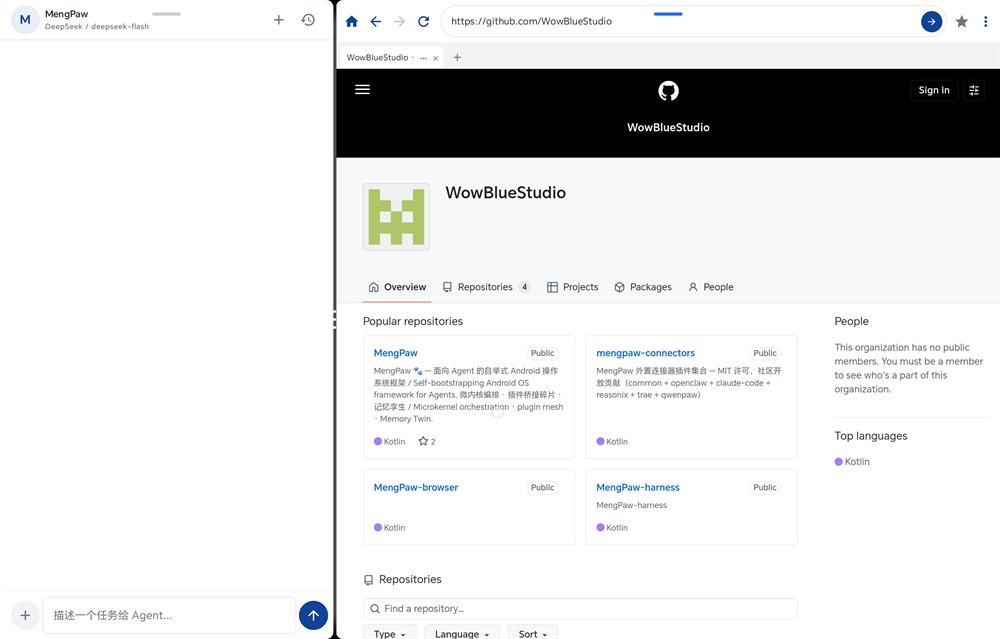
A complete Android browser: browse the web as usual, while shipping 43 Playwright-semantics commands. Remote control runs over an on-device am bridge guarded by a signature permission, available to same-signature apps (MengPaw Shell being one of them) — full-page screenshots plus coordinate clicks, with no scrolling, locating, or stitching.
What the browser
actually does
Command names follow Playwright semantics, so there is no custom syntax to learn — and everyday browsing features are all present.
Playwright-semantics commands
43 commands: page.* (22) for navigation, clicks, form filling, assertions and JS execution, plus browser.* (21) for tabs, cookies, storage and waiting.
Full-page capture, coordinate clicks
A single page.load performs navigation, segmented full-page capture and coordinate setup — click by segment coordinates even on extremely long pages.
PDF and Markdown preview
Built-in pdf.js with Chinese glyph CMaps renders PDFs nearly full-screen: 40%–400% zoom, selectable and copyable text; Markdown documents render as readable output.
Everyday browsing included
Multiple tabs, ad blocking, cookie and storage management, custom User-Agent, article text extraction — fully usable as a daily browser without any agent.
Three steps
to get an agent driving
Prerequisite: MengPaw.Browser is installed, and the caller is signed with the same key (third-party apps are rejected by the system — see the next section).
# 1. Wake the browser (the am bridge is unreachable while it is not running)
am start -a com.mengpaw.action.OPEN_URL \
  --es url "https://example.com"

# 2. One command: navigate + segmented full-page capture + coordinates
am startservice -n com.mengpaw.browser/.service.RunCommandService \
  --es com.mengpaw.browser.RUN_COMMAND_ARGUMENTS \
      "-c,page.load https://example.com" \
  --es com.mengpaw.browser.RUN_COMMAND_OUTPUT \
      /storage/emulated/0/MengPaw/out.txt
Output lands in the public MengPaw/ directory, ready to be piped through grep / head / tail.
# 3. Read the image, click by segment coordinates, filter extraction
page.click 1 320 480
page.content --grep "price" --head 20
page.fill "#q" "MengPaw"
page.screenshot --full
page.wait_selector ".result" --timeout 5000
- Security boundaryThe bridge relies on the signature permission
com.mengpaw.permission.RUN_BROWSER_COMMAND, callable only by same-signature apps; a payload whitelist admitspage.*/browser.*only and rejects arbitrary shell commands. - Output confinementCommand output is always written under the public
MengPaw/directory, never to arbitrary system paths.
Who is allowed
to drive it
Since v0.9.0 the browser keeps a single control channel: the am bridge. It is guarded by an Android signature permission, so only apps signed with the same key can issue commands — MengPaw Shell is one such app. Any third-party shell-style software can adapt by signing its own build and following the same command manual.
- RetiredThe 9880 HTTP bridge and the "open MCP control" mode were removed in v0.9.0. There is no MCP server, port, or toggle, and third-party apps cannot connect over a network interface.
- Standalone useWith no agent and no shell installed, it is simply a working browser — ad blocking, multiple tabs, PDF and Markdown preview all included.
- To drive itInstall a same-signature caller (such as MengPaw.shell) and send
page.*commands from the manual.
Why not
another approach
Four ways to "let an agent browse" — the trade-offs are not the same.
| Dimension | MengPaw.Browser | Desktop Playwright / Selenium | Accessibility auto-clicker apps | Copy-paste content by hand |
|---|---|---|---|---|
| Where it runs | On mobile, always available | Requires a running desktop | On mobile | On mobile |
| Connection | am bridge (on-device, app to app) | adb / remote port forwarding | Accessibility service (frequently killed) | Manual operation |
| Root / Shizuku needed | Neither | No (but needs a desktop) | Usually one of them | Neither |
| Session state | Own cookies, logins and JS environment | Own isolated browser environment | No control over the web session | Only the snippet copied |
| Very long pages | Segmented full-page capture, coordinate clicks, zero scrolling | Scrolling and stitching are on you | Only the visible viewport, click by click | Scrolling by hand |
| Command surface | 43 Playwright-semantics commands | Full Playwright API | None — image recognition only | None |
| Security model | Signature permission, same-signature callers only | Exposed port, hardening up to you | Accessibility permission is very broad | No extra exposure |
* For selection reference only: desktop Playwright still has the richer ecosystem and API surface, and remains the better choice when your agent already runs on a desktop. The value here is "on-device, no desktop, no root".
Check these
before installing
| Item | Requirement / notes |
|---|---|
| Android version | Android 8.0 (API 26) or newer; targets API 35 |
| Package size | 10.83 MB (11,354,677 bytes) |
| Package name | com.mengpaw.browser (a separate app from MengPaw.shell) |
| CPU architecture | One universal build covering mainstream ARM and x86 devices; no per-ABI splits |
| Device requirement | System WebView, used to render pages and the PDF / Markdown previews (present on virtually all devices) |
| Root required | No |
| Shizuku required | No (listed on this site as ecosystem reference only; the project does not depend on it) |
| Termux required | No (am commands come from the caller; Termux is just one common carrier) |
| Google services | Not required |
| Network permissions | INTERNET, ACCESS_NETWORK_STATE — for loading web pages |
| Notification permission | POST_NOTIFICATIONS — for foreground prompts where needed |
| "All files access" | Optional: MANAGE_EXTERNAL_STORAGE lets screenshots and output be written to the public MengPaw/ directory. Without it browsing works normally; only automated screenshot archiving is affected |
| Semi-auto prerequisite | The caller must be signed with the same key as the browser; calls from other apps are rejected by the system by design |
Download
the APK
Both links serve the same artifact; the Gitee mirror is usually faster from mainland China.
MengPaw.Browser v0.10.1
Release build · published 2026-09-10 · versionCode 17 · not obfuscated, no bundled third-party SDKs or ad libraries, and signed so you can verify it yourself.
C9DAC0DC29670DAF534C168244C2155A9AB4F8FED99DA1BC1A7E8A16BC41E0A8
- File name
- mengpaw-browser-v0.10.1-release.apk
- Size
- 10.83 MB
- System
- Android 8.0+
- Signer
- CN=MengPaw, OU=Studio, O=WowBlue
- Cert fingerprint
- SHA-256 7e4e61b6042c195f20c0d10d7e25baa1ad69b8835bdf5b33bd4a6b2612e0078a
- Signature scheme
- APK Signature Scheme v2 (RSA 2048)
- License
- AGPL-3.0-or-later or commercial license
- Source
- github.com/WowBlueStudio/MengPaw-browser
Three steps to install
-
Download the APK
Use either button above to get
mengpaw-browser-v0.10.1-release.apk(about 11 MB). An "this type of file may be harmful" warning is Android's standard notice for sideloaded installers. -
Allow installs from unknown sources
When prompted, allow your browser or file manager to "install unknown apps", then tap the package to install. Some devices require enabling this manually under Settings → Apps → Special access.
-
Open and browse
A MengPaw.Browser icon appears in the launcher, and it browses the web immediately — no further configuration required. If you later want automated screenshot archiving, grant "all files access" when prompted.
Verify your download
Compare the SHA-256 on a desktop with the value shown above; a match means the file was neither tampered with nor truncated.
# Windows (PowerShell)
Get-FileHash .\mengpaw-browser-v0.10.1-release.apk -Algorithm SHA256

# macOS / Linux
shasum -a 256 mengpaw-browser-v0.10.1-release.apk
On mobile, an APK signature-check tool can confirm the certificate fingerprint 7e4e61b6…e0078a.
Still
moving forward
Clarifies that the project is a neutral, independent project — its own version line, releases, update path and documentation. Only two couplings to Shell remain: command-manual sync and shared Android engineering notes. Documentation-only change; functional code is identical to v0.10.0.
Adds near-full-screen PDF viewing: 40%–400% zoom, selectable and copyable text, Chinese glyph CMaps; opens remote .pdf links and local PDFs delivered through VIEW intents from file managers (30 MB per-file limit).
Removes the HTTP bridge and "open MCP control", converging on the signature-permission-protected am bridge; after de-duplication the command surface is page.* (22) plus browser.* (21).
Introduces the page.* Playwright-semantics command surface, the combined page.load entry point, the am bridge and segmented coordinates for very long pages.
- Known limitationsPassword-protected PDFs cannot be unlocked yet (the viewer prompts and closes); the v0.10.0 pdf.js rendering and text layer are still being validated on real devices. Test status: 26 unit tests green (ad blocking 8 / smart navigation 13 / PDF utilities 5).
- UpdatesThere is no built-in auto-updater; new versions are published under Releases on GitHub and Gitee. Come back to this page or the repository Releases and install over the current version — matching signatures upgrade smoothly.
Open source,
auditable
Dual licensing
The community edition is AGPL-3.0-or-later; commercial use can be covered by a separate commercial license (LicenseRef-Commercial). Personal use and modification carry no gatekeeping.
Source available
The APK is built from a public repository, so you can compile it yourself and compare artifacts. The repo also maintains the full command manual and developer documentation — no closed components.
Privacy commitment
No accounts, no analytics, no ad SDKs; browsing history, cookies and screenshots stay on the device and are never uploaded. Network requests only happen when you visit a site.
Security by design
The control channel is protected by an Android signature permission limited to same-signature apps; command payloads pass a whitelist and output paths are confined, structurally limiting abuse.
Before you
download
No. It is a standalone browser that works the moment you open it. Only if you want an agent to operate it do you need a same-signature caller (for example MengPaw.shell).
By design. Since v0.9.0 the 9880 HTTP bridge and open mode are retired, leaving only the am bridge behind a signature permission; non-matching apps are rejected by the system — this avoids giving any app an entry point into logged-in web sessions.
No. The product name carries an early naming convention, but the current version has no MCP server, port, or toggle. Remote control instead runs over the on-device am bridge with Playwright-aligned command semantics.
Android 8.0 or newer covers mainstream ARM and x86 devices; no root, no Google services, no Shizuku. The installer is about 11 MB.
No. No accounts, no analytics, no ad SDKs; history and screenshots live on the device under the public MengPaw/ directory and can be cleared at any time. The source is public for verification.
Only so automated screenshots and command output can be written to the public directory for the caller to read. Declining it leaves browsing fully functional; only screenshot archiving is affected.
They are independent projects. The browser was split out of the main repository as an APK artifact and now evolves on its own: separate version numbers, releases and docs. Shell using it as a tool is Shell's own integration decision.
Yes. Multiple tabs, ad blocking, cookie and storage management, custom User-Agent, PDF and Markdown preview are all there; if you never touch the agent features it is simply a lightweight browser.
Docs and
ecosystem
- Command manualMengPaw_Browser_skills.md — all 43 commands, the semi-auto loop, form automation, scraping and troubleshooting.
- Developer docsMengPaw.Browser developer documentation — architecture, directory layout, am bridge implementation and security boundaries.
- Release notesCHANGELOG.md — per-version changes, known limitations and test status.
In-site documentation pages are still catching up with these releases; where they disagree, the repository is authoritative.
Termux and Shizuku are ecosystem references (common am command carrier / permission tooling); this project depends on neither.
Leave the browsing
to your agent
MengPaw.Browser v0.10.1 · 10.83 MB · Android 8.0+ · Free and open source